AI Powered Test Reviews Using README.md
Why a README.md was Required
As automation test suites grow, consistency becomes harder to maintain. Test cases are often written by different engineers, at different times, and under different assumptions. Over time, practices related to synchronization, locator placement, test data handling, cleanup, and test structure tend to drift. Many of these conventions live only in people’s heads or are inferred from existing code, rather than being explicitly documented.
The introduction of AI assisted coding amplifies this problem. AI tools generate code based on visible patterns. If those patterns include outdated or unintended approaches, such as hard waits or inline locators, AI will continue to reproduce them. Without a clear and machine readable definition of acceptable practices, both human reviewers and AI tools lack a consistent reference point.
To solve this, a README.md file can be added directly into the automation repository. Its purpose is to define a clear, enforceable set of automation test case guidelines. The document is written to be precise enough for engineers to follow and structured enough for AI tools to interpret. This transforms the README.md from passive documentation into an active enforcement mechanism.
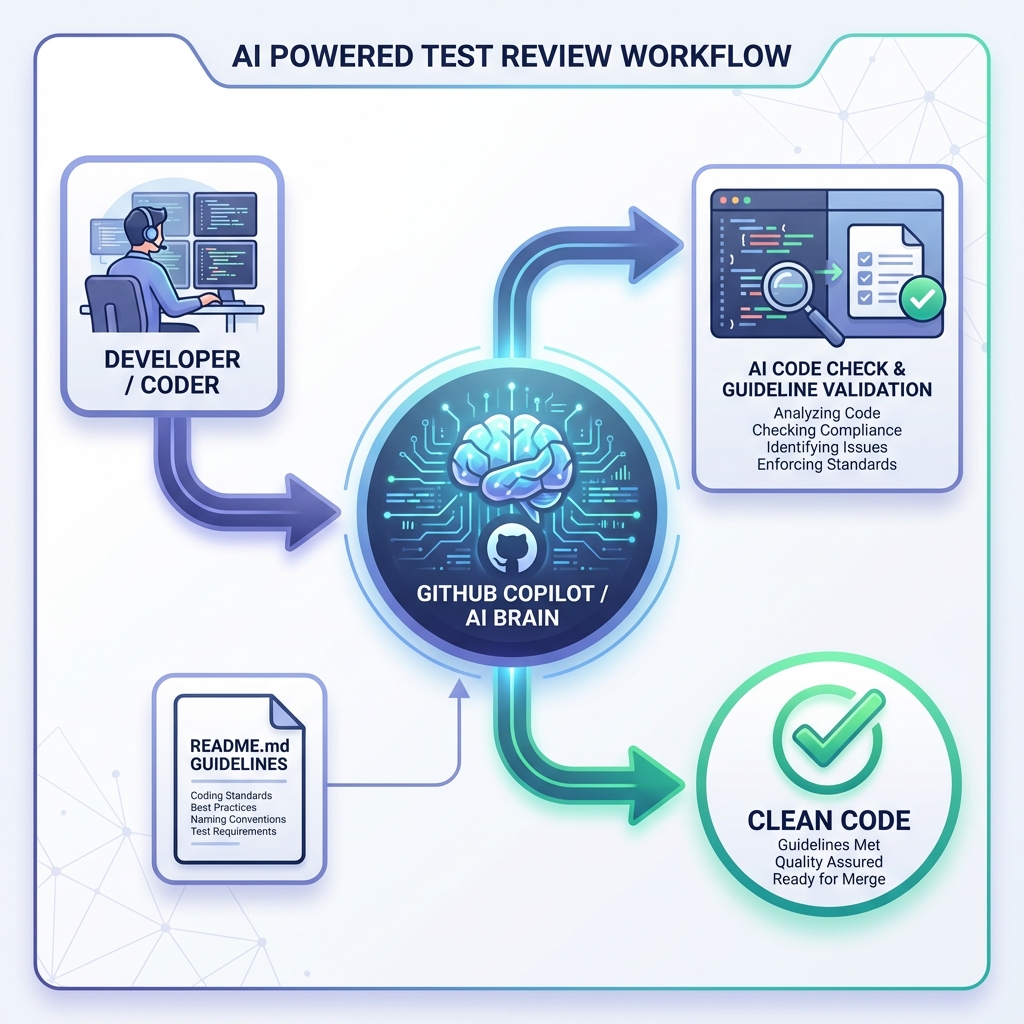
README.md as an Enforcement Layer
The README.md defines explicit rules and patterns for:
- Synchronization and wait strategies
- Locator ownership and placement
- Page Object Model usage
- Test data uniqueness
- Test isolation and cleanup
- Test organization and grouping
These rules establish what compliant automation test cases should look like. GitHub Copilot is then used to apply these rules consistently during code creation, refactoring, and review.
Referencing Guidelines Inside Test Files
Automation test files explicitly reference the README.md to give Copilot immediate context.
package com.example.tests;

import org.testng.annotations.Test;

public class LoginTest extends BaseTest {
    // Copilot now knows to follow your guidelines
}
This small addition has a large impact. Copilot now generates suggestions that align with repository specific standards instead of generic automation examples.
Example: Synchronization During Test Writing
When you type, Copilot will auto-suggest code following your patterns:
@Test
public void testLogin() {
    // Type: "wait for login button"
    // Copilot suggests ✅:
    WebDriverWait wait = new WebDriverWait(driver, Duration.ofSeconds(10));
    WebElement loginButton = wait.until(
        ExpectedConditions.elementToBeClickable(By.id("login-btn"))
    );

    // Instead of ❌:
    // Thread.sleep(3000);
}
Copilot avoids suggesting Thread.sleep or implicit waits because those patterns are explicitly disallowed in the README.md.
Example: Enforcing Page Object Model
If a test begins to include inline locators, Copilot steers generation toward Page Objects.
public class LoginPage {
    private final WebDriver driver;
    private final By usernameField = By.id("username");
    private final By passwordField = By.id("password");
    private final By submitButton = By.id("login-btn");

    public LoginPage(WebDriver driver) {
        this.driver = driver;
    }

    public void login(String username, String password) {
        new WebDriverWait(driver, Duration.ofSeconds(10))
            .until(ExpectedConditions.visibilityOfElementLocated(usernameField))
            .sendKeys(username);

        driver.findElement(passwordField).sendKeys(password);
        driver.findElement(submitButton).click();
    }
}
When you start typing raw Selenium commands, Copilot interrupts to suggest the Page Object pattern:
@Test(groups = {"smoke", "login"})
public void testLogin() {
    // Type: "driver.find..."
    // Copilot suggests ✅:
    LoginPage loginPage = new LoginPage(driver);
    loginPage.login("testuser", "password");

    // Instead of Inline Locators ❌:
    // driver.findElement(By.id("username")).sendKeys...
}
Example: Unique Test Data Generation
The README.md explicitly requires unique test data to support parallel execution. Copilot follows this pattern when generating setup logic.
// Type: "email variable"
// Copilot suggests ✅:
String userEmail = "testuser_" + System.currentTimeMillis() + "@example.com";

// Instead of Hardcoded Data ❌:
// String userEmail = "test@example.com";
This prevents data collisions and reduces false failures during concurrent test runs.
Inline Copilot Prompts
While coding, use comments to guide Copilot:
// Create a test following selenium-java-e2e-guidelines
// Use explicit waits, page object pattern, unique test data
@Test(groups = {"smoke"})
public void testResourceCreation() {
    // Copilot will generate code following guidelines
}
Reviewing Code with Copilot Chat
Copilot Chat is used as a rule based reviewer by asking it to validate test cases against README.md.
Example prompts:
Copilot flags issues such as:
- Inline locators in test methods
- Missing explicit waits
- Hard coded test data
- Missing test grouping annotations
Real Example - Code Review Session
Your Code:
@Test
public void testLogin() {
    driver.findElement(By.id("username")).sendKeys("testuser");
    driver.findElement(By.id("password")).sendKeys("password");
    driver.findElement(By.id("login-btn")).click();
    Thread.sleep(2000);
    Assert.assertTrue(driver.findElement(By.id("dashboard")).isDisplayed());
}
Ask Copilot Chat:
Review this test against the guidelines in README.md
Copilot Response:
1. **Inline Locators** (Lines 3-5)
- Guideline: "All locators must be stored as private final By fields in page objects"
- Fix: Move to LoginPage class
2. **Thread.sleep** (Line 6)
- Guideline: "Never use Thread.sleep() for synchronization"
- Fix: Use WebDriverWait
3. **No Page Object**
- Guideline: "Always use Page Object Model pattern"
- Fix: Create LoginPage and DashboardPage
4. **No TestNG Group**
- Guideline: "Every test must have TestNG groups"
- Fix: Add @Test(groups = {"smoke", "login"})
// LoginPage.java
public class LoginPage {
    private final WebDriver driver;
    private final By usernameField = By.id("username");
    private final By passwordField = By.id("password");
    private final By loginButton = By.id("login-btn");

    public LoginPage(WebDriver driver) {
        this.driver = driver;
    }

    public void login(String username, String password) {
        new WebDriverWait(driver, Duration.ofSeconds(10))
            .until(ExpectedConditions.visibilityOfElementLocated(usernameField))
            .sendKeys(username);
        driver.findElement(passwordField).sendKeys(password);
        driver.findElement(loginButton).click();
    }
}

// LoginTest.java
@Test(groups = {"smoke", "login"})
public void testLogin() {
    LoginPage loginPage = new LoginPage(driver);
    loginPage.login("testuser", "password");

    WebDriverWait wait = new WebDriverWait(driver, Duration.ofSeconds(10));
    Assert.assertTrue(
        wait.until(ExpectedConditions.visibilityOfElementLocated(
            By.id("dashboard")
        )).isDisplayed()
    );
}
Copilot Chat Commands Library
Save these commands for quick access:
General Review:
@workspace Review this file against the guidelines in README.mdSpecific Checks:
Check for Thread.sleep or implicit wait violations in this fileVerify all locators are in Page Objects and not inlineCheck if test data has unique identifiers (timestamp/UUID)Review synchronization patterns - are WebDriverWait used correctly?Code Generation:
Generate a Page Object class following the guidelines in README.md
for a login page with username, password, and submit buttonCreate a TestNG test following our E2E guidelines that creates
a resource via API and verifies it in UIPull Request Enforcement with Copilot
During Pull Request Review:
- Go to your PR on github.com
- In the comment box, type:
@github review this PR against the guidelines in README.mdCopilot analyzes only the changes introduced in the PR and flags violations early. This creates a consistent quality gate before human review begins.
Repository Wide Reviews Using Workspace Context
For large repositories, Copilot workspace context enables bulk validation.
@workspace Review all automation test files for compliance with README.mdThis is particularly useful for:
- Cleaning up legacy tests
- Preparing the codebase for parallel execution
- Ensuring new standards are applied consistently
Locking Rules with copilot-instructions.md
A .github/copilot-instructions.md file ensures Copilot always applies the same rules.
Always follow the automation guidelines defined in README.md

NEVER suggest Thread.sleep or inline locators
ALWAYS use explicit waits and Page Objects
ALWAYS generate unique test data
This removes reliance on prompt wording and makes guideline adherence the default behavior.
Outcome
By placing a clear README.md directly into the automation repository and integrating it deeply with GitHub Copilot, automation standards become executable rather than advisory. The README.md defines what compliant automation looks like, and Copilot applies those rules consistently during development, review, and maintenance.
This approach scales automation quality enforcement without increasing manual review effort and provides a sustainable model for maintaining reliable automation test cases as teams and tooling evolve.